At the beginning of World War II, uniforms were accompanied by a variety of lapel insignia. They differed by the names of positions and ranks, the type of emblems, the colors of the piping and buttonholes, as well as the number of insignia and their production technology.
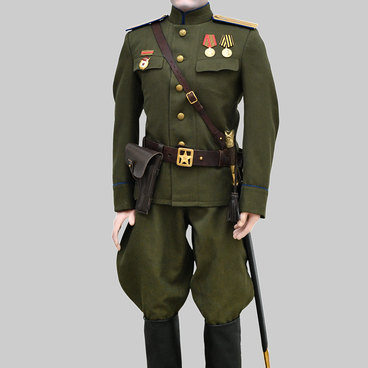
In January 1943, shoulder boards came about upon the Decree of the Presidium of the Supreme Soviet “On the introduction of new insignia for the personnel of the Red Army”. The width of the shoulder straps was 6 cm, and their length ranged from 14 to 16 cm depending on the size of the clothes.
There were everyday wear and field duty shoulder boards.
Everyday shoulder boards were made of colored cloth with colored trim and had longitudinal lines indicating the branch of troops. Commanders had golden shoulder boards with stars and silver emblems indicating the armed service branch. The shoulder boards of cavalry officers were dark blue.
The field shoulder boards were made of khaki cloth, the color of the edging indicated the branch of troops. The color of the edges of cavalry shoulder boards was dark blue.
This particular appearance of shoulder boards existed from 1943 to 1955. In 1955, it underwent some changes.
In January 1943, shoulder boards came about upon the Decree of the Presidium of the Supreme Soviet “On the introduction of new insignia for the personnel of the Red Army”. The width of the shoulder straps was 6 cm, and their length ranged from 14 to 16 cm depending on the size of the clothes.
There were everyday wear and field duty shoulder boards.
Everyday shoulder boards were made of colored cloth with colored trim and had longitudinal lines indicating the branch of troops. Commanders had golden shoulder boards with stars and silver emblems indicating the armed service branch. The shoulder boards of cavalry officers were dark blue.
The field shoulder boards were made of khaki cloth, the color of the edging indicated the branch of troops. The color of the edges of cavalry shoulder boards was dark blue.
This particular appearance of shoulder boards existed from 1943 to 1955. In 1955, it underwent some changes.