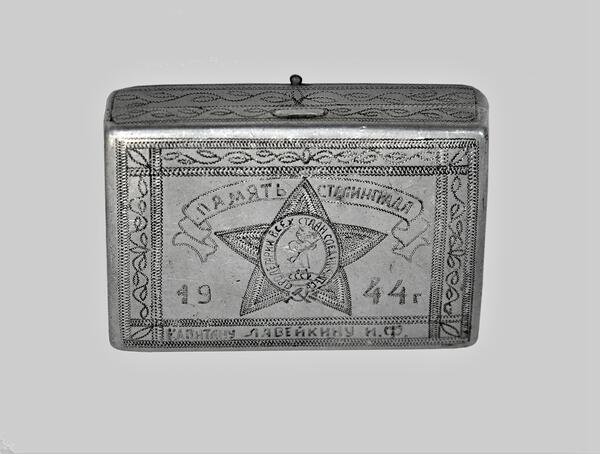
The museum of the 112th Bashkir Cavalry Division keeps a 1944 cigarette case “Memory of Stalingrad”.
The Battle of Stalingrad began on July 17, 1942 and ended on February 2, 1943. In terms of the military operations it was divided into two stages: the defensive, which lasted until November 19, 1942, and the offensive, which culminated in the defeat of the Wehrmacht strategic forces in the Volga-Don interfluvial area. The 112th Bashkir Cavalry Division as part of the 8th Cavalry Corps participated in the second stage of the Battle of Stalingrad on the Southwestern Front.
The handmade cigarette case presented in the museum belonged to Captain I. F. Laveikin. At the front soldiers also had cases for mouthpiece cigarettes, but they were mostly factory-made. If a soldier had neither a cigarette case nor a tobacco pouch, he simply carried tobacco in his pocket.
Cigarette cases were engraved with the owner’s name so that they would not fall into someone else’s hands. They also had pictures and inscriptions on them, usually in a jocular form, to remind them of the inviolability of other people’s property or to urge them to fight the enemy more furiously.
During the Great Patriotic War, many simple items (a pencil, a purse, a spoon) were of special value to the front-line soldiers.
The Battle of Stalingrad began on July 17, 1942 and ended on February 2, 1943. In terms of the military operations it was divided into two stages: the defensive, which lasted until November 19, 1942, and the offensive, which culminated in the defeat of the Wehrmacht strategic forces in the Volga-Don interfluvial area. The 112th Bashkir Cavalry Division as part of the 8th Cavalry Corps participated in the second stage of the Battle of Stalingrad on the Southwestern Front.
The handmade cigarette case presented in the museum belonged to Captain I. F. Laveikin. At the front soldiers also had cases for mouthpiece cigarettes, but they were mostly factory-made. If a soldier had neither a cigarette case nor a tobacco pouch, he simply carried tobacco in his pocket.
Cigarette cases were engraved with the owner’s name so that they would not fall into someone else’s hands. They also had pictures and inscriptions on them, usually in a jocular form, to remind them of the inviolability of other people’s property or to urge them to fight the enemy more furiously.
During the Great Patriotic War, many simple items (a pencil, a purse, a spoon) were of special value to the front-line soldiers.