Font
Color
Graphics
Изображение точки

To see AR mode in action:

1. Install ARTEFACT app for iOS or Android;

2. Find the exhibition «History of the region: 1589 – early 20th century»

3. Push the «Augmented reality» button and point your phone's camera at the exhibit;

Скрыть точки интересаПоказать точки интереса
Показать в высоком качестве

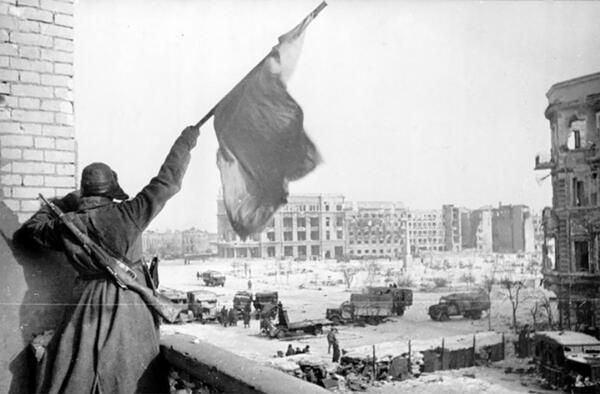
Victory Banner at Stalingrad

Creation period
January 1943
Place of сreation
Stalingrad, USSR
Dimensions
19,5x24,5 cm
Technique
photo paper, photo printing
0
Open in app
#1
Victory Banner at Stalingrad
#2

One of the most notable symbols of victory in the Battle of Stalingrad is a black-and-white photograph taken on one of the January days of 1943 by photographer Georgy Zelma. The photographer succeeded in capturing an image of a Red Army soldier bearing a banner. The photograph depicts a combatant on the balcony of a building situated within the area designated as the Square of the Fallen Fighters. By late January, the Battle of Stalingrad was approaching its conclusion. The last German troops defending the approaches to the square were forced to withdraw on 30 January, with units of the 38th Motorized Rifle Brigade of the 64th Army advancing through Krasnoznamenskaya, Surskaya and Lomonosov Street. This enabled them to reach the Square of the Fallen Fighters. The following day saw the surrender of the headquarters of the southern group of German forces, which marked the liberation of the city centre. That morning, approximately 6,700 German soldiers and officers surrendered in the immediate vicinity of the square.


The author of the photograph, Georgy Anatolievich Zelma, was a news photographer for the Izvestia newspaper during the Battle of Stalingrad. Between July 1942 and February 1943, he documented the events in Stalingrad, creating a unique photographic record of the battles for the city.

#3
read morehide

Victory Banner at Stalingrad

Creation period
January 1943
Place of сreation
Stalingrad, USSR
Dimensions
19,5x24,5 cm
Technique
photo paper, photo printing
0
Point your smartphone camera to open in the app
Share
VkontakteOdnoklassnikiTelegram
Share on my website
Copy linkCopied
Copy
Open in app
To see AR mode in action:
  1. Install ARTEFACT app for 
  2. iOS or Android;
  3. Find and download the «Paintings in Details» exhibition
  4. Push the «Augmented reality» button and point your phone's camera at the painting;
  5. Watch what happens on your phone screen whilst you flip through the pictures.
 
We use Cookies
Cookies on the Artefact Website. We use cookies to ensure that we give you the best experience on our website. If you continue without changing your settings, we'll assume that you are happy to receive all cookies on the Artefact website. However, if you would like to, you can change your cookie settings at any time.
Learn more about useHide
Content is available only in Russian

X

Нашли опечатку?...

%title%%type%