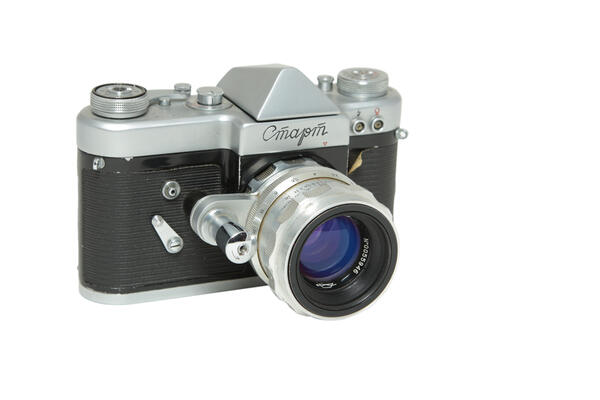
The appearance of this Krasnogorsk SLR wasquite unusual: everyone who saw it for the first time immediately asked about the purpose of the bracket with a large button on the lens. After the mechanism is examinedcloser, a lot of small details unfamiliar for Soviet photographic equipmentcould be found: a knife for cutting off a film, a bayonet mount for optics and a removable pentaprism. Because of these differences and some other features, some foreign photographers called it ‘Soviet Exacta’.


Start
Creation period
1958-1964
Place of сreation
Russia, Moscow region, Krasnogorsk
Dimensions
15 x 10 cm
Technique
Photographic equipment
Collection
0
Open in app#1
KMZ
Start
#2
#3
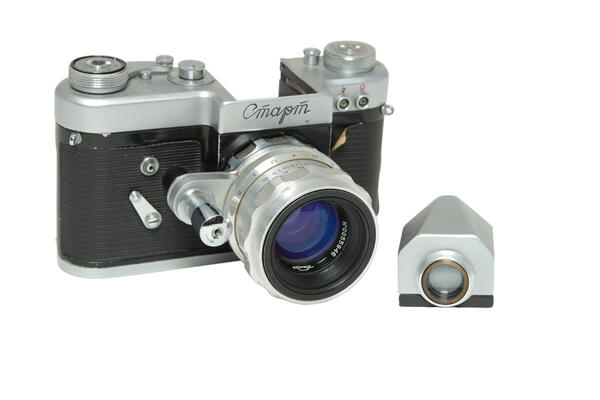
Camera Start with removable pentaprism
#4
Let’s reveal the secret: the button on the lens barrel was combined with the shutter release and served to close the aperture just before shooting. In order to accurately focus the lens, the aperture had to first be fully opened and closed before shooting. In modern digital SLRs, the problem has been eliminated by a jumping aperture, which is closed by an electromagnet only at the time of shooting. Most amateur photographers are not even aware of its work and existence always observing a bright image in the eyepiece.
#5
In 1958, when the first batch of Starts rolled off the assembly line, designers from all over the world were still struggling with the diaphragm. Pressing aperture of the “Start” operated from this large button, which first closed it to the working state and then released the shutter.
#6
Russian Museum of Photography
read morehide
00:00
00:00
1x
Start
Creation period
1958-1964
Place of сreation
Russia, Moscow region, Krasnogorsk
Dimensions
15 x 10 cm
Technique
Photographic equipment
Collection
0
 Point your smartphone camera to open in the app
Open in app
Share