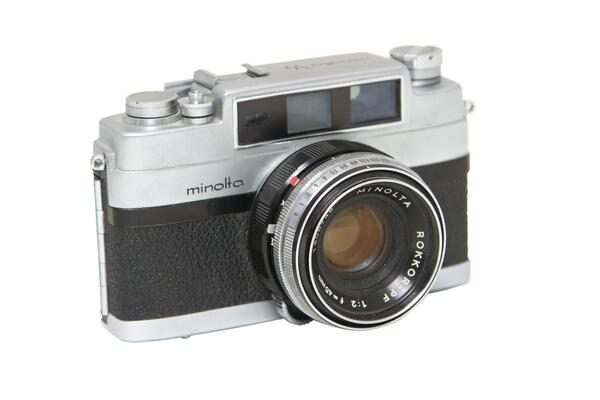
This simple-looking Japanese ‘rangefinder’ has played a significant role in the history of our country. It was the camera the special photographer Igor Snegirev captured Yuri Gagarin. In those years, this name was unknown, because, like many leading rocket scientists and other specialists of Baikonur, Snegirev was strictly classified. The pictures included the signature of Lieutenant Colonel Borisenko, who was in charge of this special photographer.


Minolta V2
Creation period
1958
Place of сreation
Japan, Osaka
Dimensions
14x8х7 cm
Technique
Photographic equipment
Collection
0
Open in app#1
Minolta
Minolta V2
#2
#3
The most famous pictures of Gagarin, including his iconic portrait in a spacesuit, were taken with this camera, which turned out to be more reliable and more accurate than the Soviet Zenits. Now it is difficult to understand, but at that time the Minolta was considered an outstanding camera because its central shutter could work out an outstanding shutter speed of 1/2000 second. It is worth recalling that 1/500 is considered the limit for shutters of this type. In the end, Snegirev drowned this Japanese miracle when he was taking pictures of the first astronaut water skiing. However, the divers found the camera at the bottom, and after drying it worked again! Still, it didn’t last that long: in 1964, Gagarin brought a mirrored Nikkormat to his personal photographer from Japan. “DSLRs” were already advancing all around the world, and the Minolta rangefinder became a rarity.
#4
Russian Museum of Photography
read morehide
00:00
00:00
1x
Minolta V2
Creation period
1958
Place of сreation
Japan, Osaka
Dimensions
14x8х7 cm
Technique
Photographic equipment
Collection
0
 Point your smartphone camera to open in the app
Open in app
Share