


About 1497.
Copy
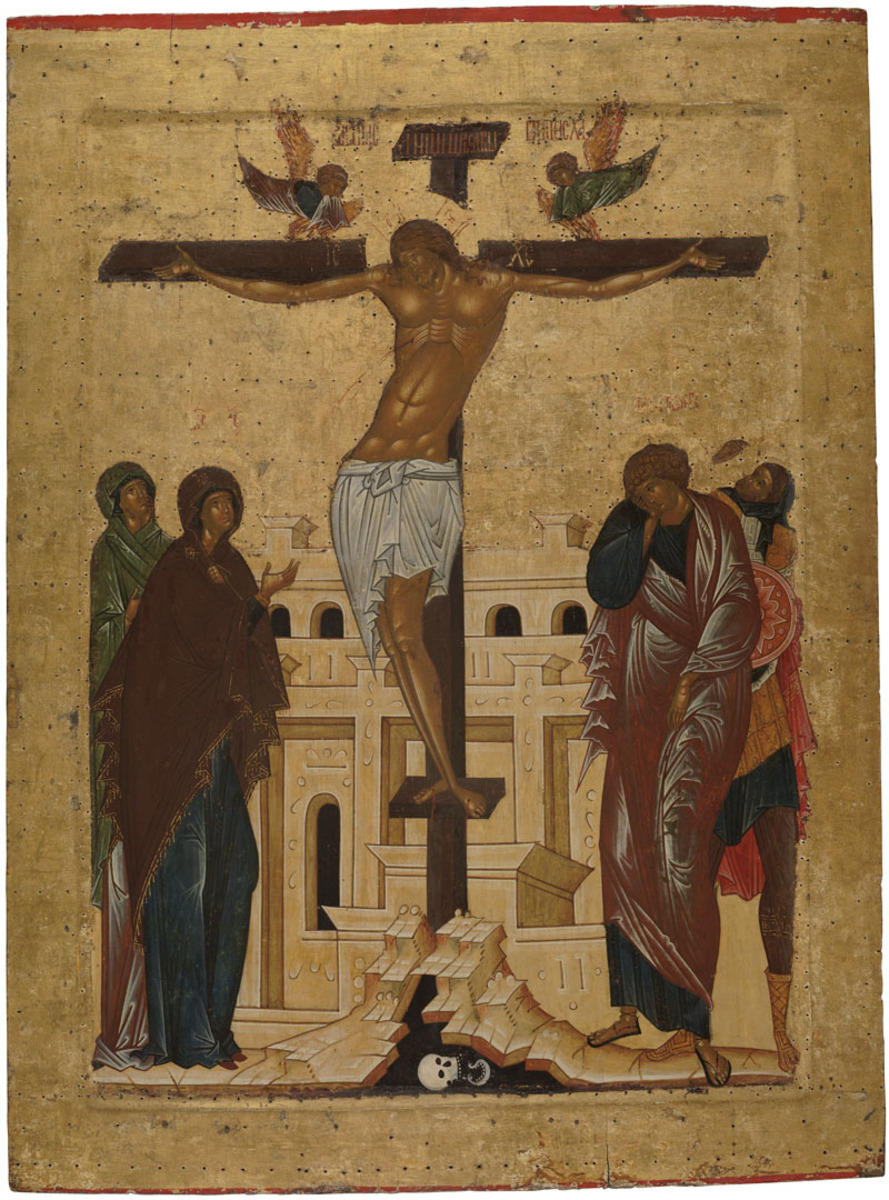
Crucifixion of Jesus is the execution of Jesus Christ by crucifixion, an episode concluding the Passions of Christ and preceding his entombment and resurrection. The Cross with crucified Jesus Christ is shown in the center of the icon. The Virgin, Mary of Clopas, St. John the Apostle and St. Longinus are standing at the foot of the cross. The composition unfolds against the background of the yellow wall of Jerusalem. Golgotha, the place where Christ was crucified, is shown as a stylized rock with a cross thereupon. Golgotha is represented with a scull of Adam inside (according to the legend, Golgotha was the place were Adam had been buried). Two angels lamenting for Christ are hovering over the cross. Crucifixion of Jesus is the execution of Jesus Christ by crucifixion, an episode concluding the Passions of Christ and preceding his entombment and resurrection. The Cross with crucified Jesus Christ is shown in the center of the icon. The Virgin, Mary of Clopas, St. John the Apostle and St. Longinus are standing at the foot of the cross. The composition unfolds against the background of the yellow wall of Jerusalem. Golgotha, the place where Christ was crucified, is shown as a stylized rock with a cross thereupon. Golgotha is represented with a scull of Adam inside (according to the legend, Golgotha was the place were Adam had been buried). Two angels lamenting for Christ are hovering over the cross.
The icon was restored by O.V. Lelekova in the All-Union Research Institute for Restoration in 1969.