


About 1497.
Copy
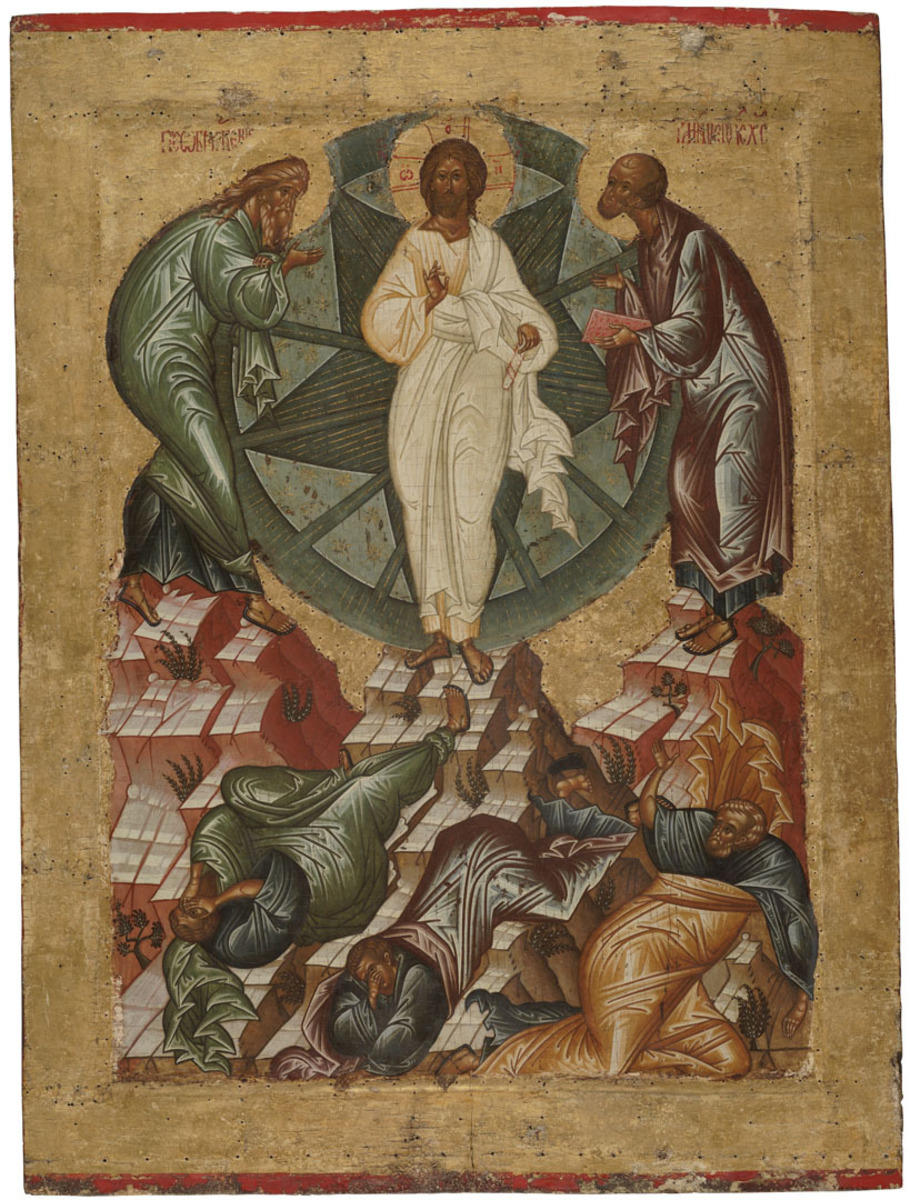
In the upper part of the icon, Jesus Christ is shown standing on the mountain peak against the dark-blue circle of glory. Prophets Elijah and Moses can be seen to his right and left, on ledges of the hill. The apostles Peter, John and Jacob are depicted below, against the background of the hills. In the upper part of the icon, Jesus Christ is shown standing on the mountain peak against the dark-blue circle of glory. Prophets Elijah and Moses can be seen to his right and left, on ledges of the hill. The apostles Peter, John and Jacob are depicted below, against the background of the hills.
According to the Gospel, Christ having taken three most devoted disciples (the apostles Peter, John and James) ascended Mount Tabor where he underwent Transfiguration in front of them showing them His Divine Glory. There the Old Testament prophets Moses and Elijah interceded with Him. All of a sudden, a bright cloud overshadowed them and they heard a voice of God the Father out of the cloud, which said, ‘This is my beloved Son, in whom I am well pleased; hear ye him’. Coming down from the mountain, Jesus charged them, saying, ‘Tell the vision to no man, until the Son of man be risen again from the dead’.
Transfiguration of Jesus shows two natures of Christ — human and divine. During the Transfiguration, his divine nature didn’t change, but was revealed in his human nature.
The icon was restored by O.V. Lelekova and A.P. Yablokov in the All-Union Research Institute for Restoration in 1972 and 1978.