Font
Color
Graphics
Изображение точки

To see AR mode in action:

1. Install ARTEFACT app for iOS or Android;

2. Find the exhibition «The Murals of the Dormition Cathedral»

3. Push the «Augmented reality» button and point your phone's camera at the exhibit;

Скрыть точки интересаПоказать точки интереса

Instruction of Joseph (Protoevangelium)

Creation period
1641
Technique
Fresco, tempera
1
Open in app
#1
Instruction of Joseph (Protoevangelium)
#2

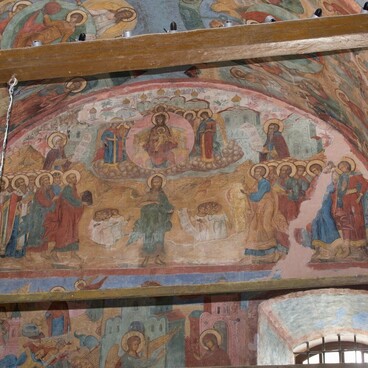
The fresco presents the composition of the Protoevangelium cycle (XI). The scene tells of the moment when Joseph, leaving the house, instructed Mary: ‘I took you from the temple of the Lord, and now you stay in my house, I leave for carpentry work, and then come back to you. God save you! ’.

The character of the image of figures shows the traditional symbolism of the icon. The Virgin Mary, as remaining in the house, is depicted against the background of the chambers, Joseph, as leaving the house, against the background of chambers and hills. His face is turned to the Mother of God, he gives Her instructions, putting his right hand in a gesture of speaking. At the same time, the elder is already stepping on rocky hills, and in his left hand holds a staff — a symbol of the traveler.

General Information:
Protoevangelium of James is early Christian apocrypha about the life of the Virgin Mary and the Nativity of Jesus Christ. Apocrypha became the basis for a comprehensive narrative cycle, traditionally included in the decoration system of the Virgin’s temples. In ancient Russian monumental painting of the 16th-17th centuries the Protoevangelium cycle is often adjacent to the cycle of the Akathist to the Virgin Mary.

Full name: Joseph’s Instructions
Creation Time: 1641
Technique: Fresco, Tempera
Location: Southern slope of the western spring arch

read morehide
00:00
00:00
1x

Instruction of Joseph (Protoevangelium)

Creation period
1641
Technique
Fresco, tempera
1
Point your smartphone camera to open in the app
Share
VkontakteOdnoklassnikiTelegram
Share on my website
Copy linkCopied
Copy
Open in app
To see AR mode in action:
  1. Install ARTEFACT app for 
  2. iOS or Android;
  3. Find and download the «Paintings in Details» exhibition
  4. Push the «Augmented reality» button and point your phone's camera at the painting;
  5. Watch what happens on your phone screen whilst you flip through the pictures.
 
We use Cookies
Cookies on the Artefact Website. We use cookies to ensure that we give you the best experience on our website. If you continue without changing your settings, we'll assume that you are happy to receive all cookies on the Artefact website. However, if you would like to, you can change your cookie settings at any time.
Learn more about useHide
Content is available only in Russian

X

Нашли опечатку?...

%title%%type%