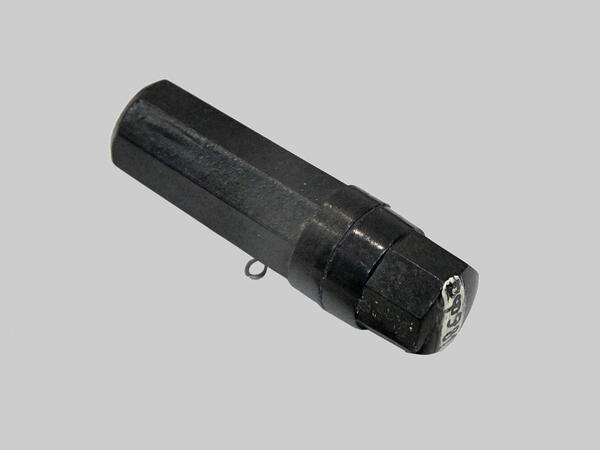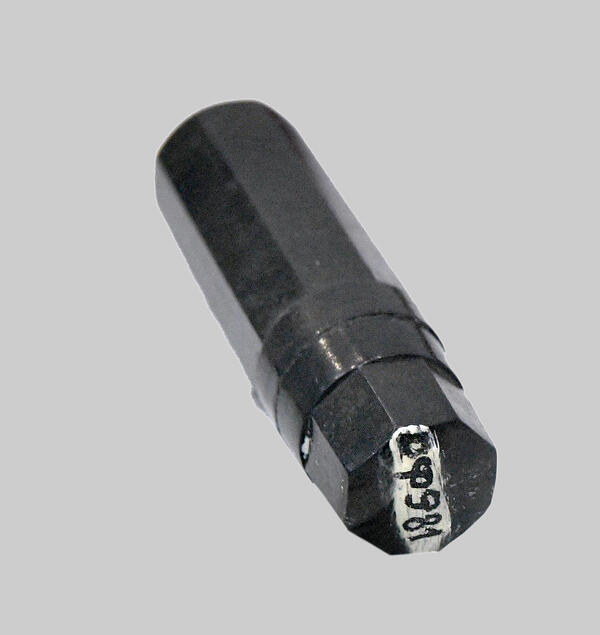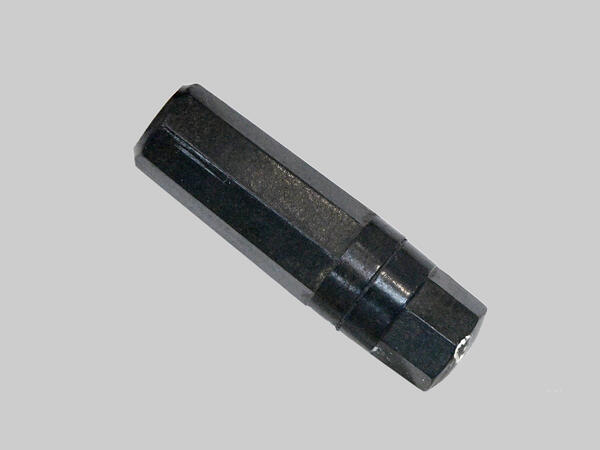
A soldier’s capsule is a case with an identification note that was kept by a soldier. In the event of a soldier’s death, his identity was established according to personal data kept in the capsule.
The capsule first appeared in Red Army in 1925 — it was given to all servicemen upon arrival at the unit. A sheet with personal information was put into a flat box, it was hung on a special braided tape around the neck. However, this form of the capsule allowed moisture and dirt to pass through: the paper with the data got damaged and became unreadable.
In 1941, new capsules were introduced in the form of an ebonite octagonal case with a screw cap. A sheet with the soldier’s personal data in two copies was put into the case. One copy of the identification paper was to be taken by the funeral detachment and handed over to the unit headquarters. The second copy was supposed to remain in the capsule with the deceased.
When filling in the identification paper, the soldier entered his personal data in the appropriate columns: last name, first name, patronymic, year of birth, military rank, data on place of birth and family, blood type. The serviceman also had to indicate the district military commissariat which called him up for military service.
The capsule first appeared in Red Army in 1925 — it was given to all servicemen upon arrival at the unit. A sheet with personal information was put into a flat box, it was hung on a special braided tape around the neck. However, this form of the capsule allowed moisture and dirt to pass through: the paper with the data got damaged and became unreadable.
In 1941, new capsules were introduced in the form of an ebonite octagonal case with a screw cap. A sheet with the soldier’s personal data in two copies was put into the case. One copy of the identification paper was to be taken by the funeral detachment and handed over to the unit headquarters. The second copy was supposed to remain in the capsule with the deceased.
When filling in the identification paper, the soldier entered his personal data in the appropriate columns: last name, first name, patronymic, year of birth, military rank, data on place of birth and family, blood type. The serviceman also had to indicate the district military commissariat which called him up for military service.