
Font
Color
Graphics
Изображение точки

To see AR mode in action:

1. Install ARTEFACT app for iOS or Android;

2. Find the exhibition «The iconostasis of the Dormition Cathedral»

3. Push the «Augmented reality» button and point your phone's camera at the exhibit;

Скрыть точки интересаПоказать точки интереса

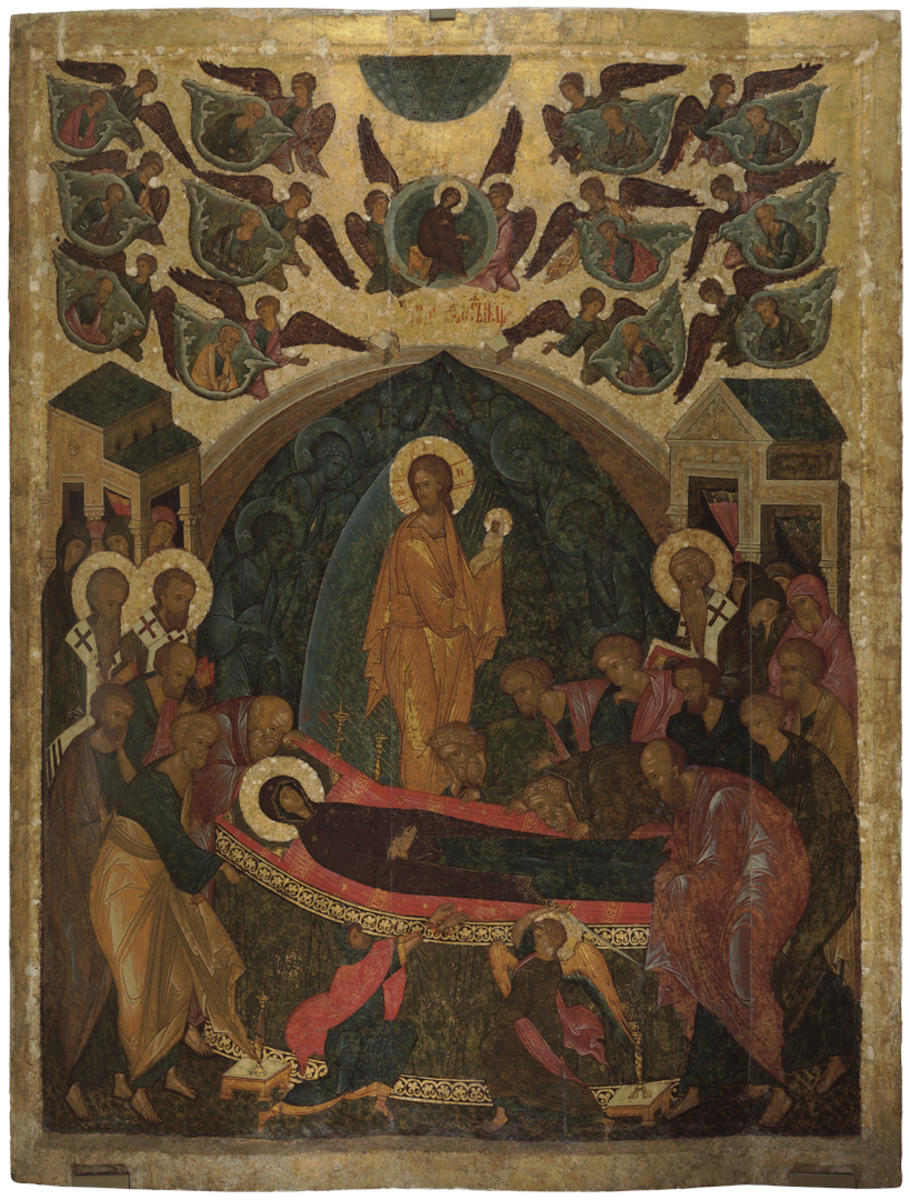
Dormition of the Virgin (Dormition with Clouds)

Creation period
About 1497
3
Open in app
#1
Dormition of the Virgin (Dormition with Clouds)
#2

About 1497

Copy

This panel depicts the death of the Virgin, an episode known as the Dormition of the Virgin, or quite literally the ‘falling asleep’ of the Mother of God.

The Virgin is depicted in the center of the composition, lying on the couch and flanked by the sweeping apostles; the Savior with the soul of the Virgin depicted as a swaddled baby stands behind the couch. In the very foreground, an angel cuts off the hands of Athonios (also known as Jephonias), who is daring to try and upset the Virgin’s deathbed. The upper part of the icon shows the opening heaven to which the angels ascend the Mother of God seated on a golden throne in a round gloriole. The apostles flying on the clouds are depicted on the left and right.

The peculiarities of the iconography refer this image to the extended version of the Dormition, the so-called ‘cloudy type’. Two events happening at different times are shown in this icon: the Apostles whom the Virgin wanted to see before her death are shown travelling on the clouds to Jerusalem in the upper part of the image and the same apostles are standing around the deathbed of the Virgin in the lower part.

The icon was restored in Kirillov in 1918 by P.I. Yukin and V.Y. Gorokhov, members of the Commission on Preservation and Restoration of Works of Old Russian Painting.

The original icon is kept in the State Tretyakov Gallery.

read morehide
00:00
00:00
1x

Dormition of the Virgin (Dormition with Clouds)

Creation period
About 1497
3
Point your smartphone camera to open in the app
Share
VkontakteOdnoklassnikiTelegram
Share on my website
Copy linkCopied
Copy
Open in app
To see AR mode in action:
  1. Install ARTEFACT app for 
  2. iOS or Android;
  3. Find and download the «Paintings in Details» exhibition
  4. Push the «Augmented reality» button and point your phone's camera at the painting;
  5. Watch what happens on your phone screen whilst you flip through the pictures.
 
We use Cookies
Cookies on the Artefact Website. We use cookies to ensure that we give you the best experience on our website. If you continue without changing your settings, we'll assume that you are happy to receive all cookies on the Artefact website. However, if you would like to, you can change your cookie settings at any time.
Learn more about useHide
Content is available only in Russian

X

Нашли опечатку?...

%title%%type%