


About 1497.
Copy
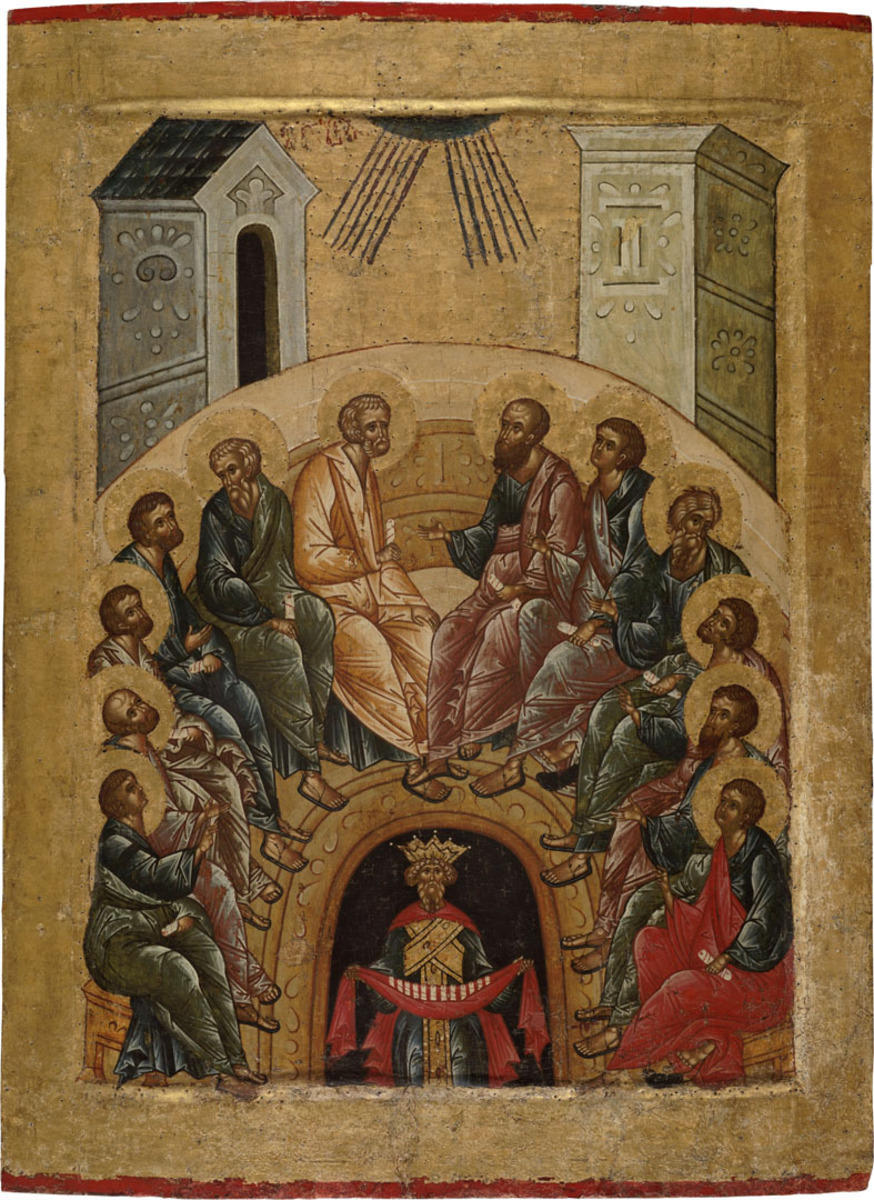
The icon shows twelve apostles sitting on the semicircular bench with a high back. Twelve rays are coming from the semicircle in the upper part of the icon and pointing toward the apostles. A man’s figure in the crown is depicted in the arched opening in the lower part of the icon. This is Cosmos, representing the people of the world living in darkness and sin. In his hands he is holding a red cloth containing twelve scrolls which represent the teaching of the apostles. The icon shows twelve apostles sitting on the semicircular bench with a high back. Twelve rays are coming from the semicircle in the upper part of the icon and pointing toward the apostles. A man’s figure in the crown is depicted in the arched opening in the lower part of the icon. This is Cosmos, representing the people of the world living in darkness and sin. In his hands he is holding a red cloth containing twelve scrolls which represent the teaching of the apostles.
According to the Acts of the Apostles, the Holy Spirit descended on the apostles on the fiftieth day after the Resurrection of Christ when all of them gathered in the Cenacle. The Holy Spirit descended upon them in the form of ‘cloven tongues of fire’, with the sound of a rushing mighty wind, and they began to speak in languages that they did not know and could preach the Gospel all over world.
The icon was restored by G.Z. Bykova in the All-Union Research Institute for Restoration in 1969.